The game loop explained: why you want a fixed timestep
- TtsetNov 3, 2026, 9:38 PM
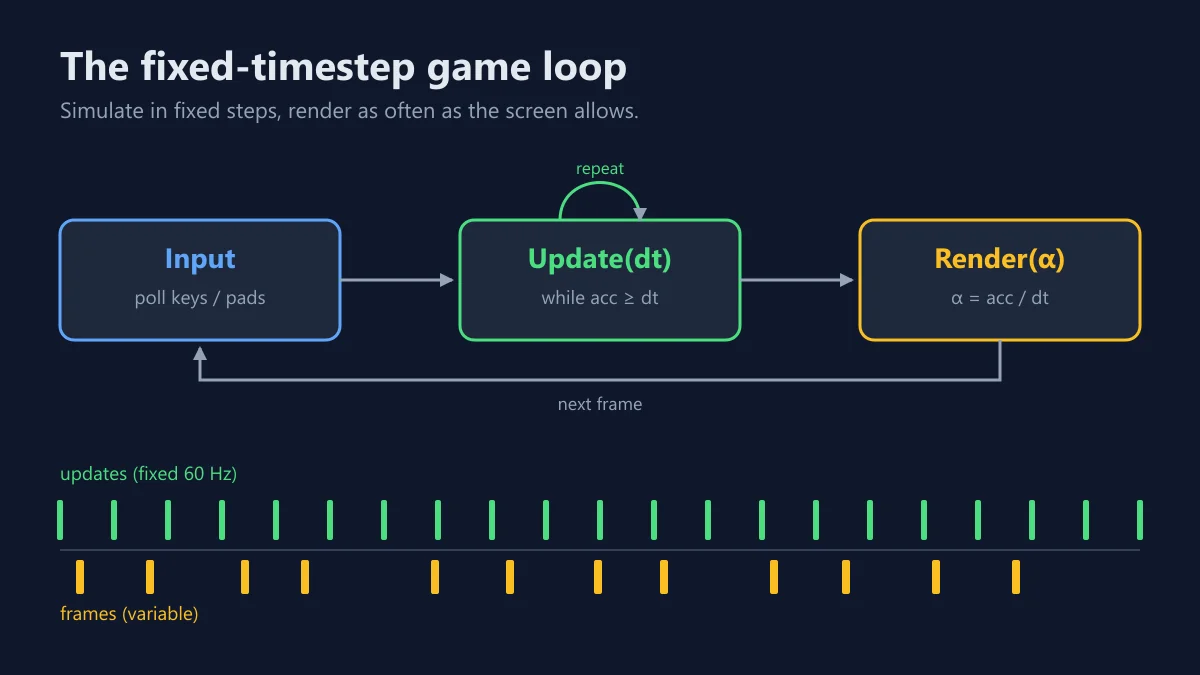
Every game, from Pong to a 3D shooter, runs the same basic loop: read input → update the world → draw it, as fast as the screen refreshes. The tricky part is how much time each update simulates.
Variable timestep (
update(frameTime)) is the simplest option, but physics behaves differently at 30 fps and at 144 fps. Jumps get higher or lower, and fast objects pass through walls on slow machines.Fixed timestep keeps the simulation deterministic. You collect the real time that has passed and spend it in fixed slices:
const dt = 1 / 60; let acc = 0, last = performance.now(); function frame(now) { acc += Math.min((now - last) / 1000, 0.25); // clamp so a stalled tab doesn't spiral last = now; while (acc >= dt) { update(dt); acc -= dt; } render(acc / dt); // alpha: how far we are between two updates requestAnimationFrame(frame); } requestAnimationFrame(frame);render(alpha)can blend each object's previous and current position, so movement stays smooth on a 144 Hz monitor even though the game only simulates 60 times a second.Engines already do this for you (Unity's
FixedUpdate, Godot's_physics_process). If you're writing a game in plain JS for a challenge, this ~15-line loop saves you a lot of "it works on my machine" bugs.